






























Order processing needs a call now
The order software supplier confirms that orders are delayed. The database runs in Frankfurt and has no failover. Procurement asks for a recovery time. The process owner decides how to handle incoming orders.

RiskStudio gives procurement, security and service owners a shared workspace. Start with a service you know. Your customer portal depends on a software supplier, and that supplier relies on a cloud provider. The Galaxy shows how companies connect.
Use the same map again. When you assess a different service, check whether it relies on the same provider before asking suppliers for the same information.
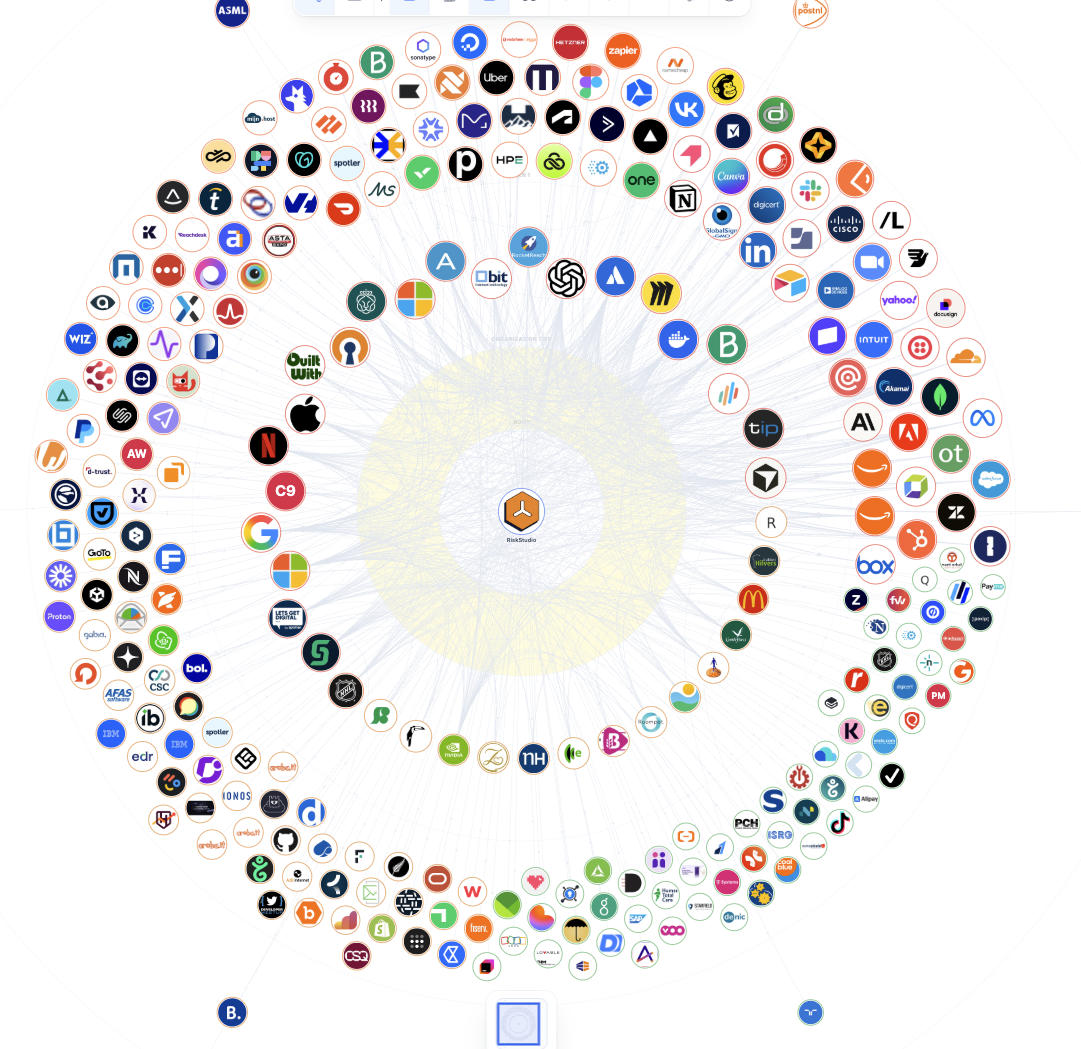
 Choose a step or click a company logo to explore relationships and intelligence.
See how a signal travels through a supplier to your organisation.
Use Build, Explore, Analyse and Monitor to investigate and follow up on a supply chain question. Select a phase to see it in action.
Record which processes are critical to your organisation and which suppliers they depend on.
For your investigation: Record your customer portal and its known software provider, for example. This defines the service you will investigate.
Discover potential indirect suppliers and review reported incidents and other risk signals. You decide which relationships to add to Build. Discovery alone uses no credits.
For your investigation: Check whether your software provider and other portal components use the same cloud platform. This shows you where to ask more questions.
Trace dependencies from a supplier to your own processes. Assess which processes could be affected and collect the findings in a report to decide where to act.
For your investigation: Bring the cloud dependencies you have found into one report. Use it to decide whether to investigate further or diversify.
Track new signals and changes in your supply chain. Compare findings with earlier reports to see whether your priorities should change.
For your investigation: Monitor the selected Insights about these providers with appropriate thresholds and notifications. New signals help you decide when to reopen the assessment.
BEAM is a continuous way of working. Start with a goal that matters to your organisation. You can make better decisions before you have mapped the entire supply chain.
Example scenario
A cloud provider reports a database outage in Frankfurt. Your order system and customer portal use different software suppliers. Your supply chain map shows that both suppliers rely on this cloud provider.
The order software supplier confirms that orders are delayed. The database runs in Frankfurt and has no failover. Procurement asks for a recovery time. The process owner decides how to handle incoming orders.
The portal supplier confirms that its database runs in Dublin and the portal is available. The team agrees to check again if the outage reaches Dublin or customers lose access.
An Initiative is the investigation your team organises around one question. For this example, ask “Which suppliers could disrupt our customer portal?” Work through it in four steps.
Add the customer portal and its known software supplier. Ask the service owner to confirm how the portal is used and who to contact.
Follow the software supplier to its hosting provider in the Galaxy. Check whether another supplier uses that provider. Add the relationships your team confirms to its map.
Bring the relevant Insights into a Report. Record which services depend on the hosting provider and what you still need to check.
Choose which changes to follow, such as a reported incident at the hosting provider. Agree when a change should prompt another look.
Limit the question to the customer portal, its suppliers and the process owner. Choose the continuity risks to investigate and use a report template if needed.
Ask procurement to complete supplier information. Check with IT which cloud service and region the software supplier uses and record confirmed relationships in Build.
Discuss the Report with the process owner. Assess which services an outage could affect, where failover is possible and what information is missing.
Assign follow-up actions. Agree who will review the periodic report, which change or threshold calls for action and when to reopen the investigation.
Two of your software suppliers use the same cloud provider. What would an incident there mean for the portal? Your team can use an Insight to check the connection, a Report to record what it learns and Monitor to follow changes.
An incident at the hosting provider prompts security to trace the path to the portal. A shared provider tells you what to check. The region and the service your suppliers use determine whether the incident is relevant.
See the incident alongside the companies involved, the supply chain path and the service in your organisation that could be affected.
See which suppliers and services connect your organisation to this company. Its country and jurisdiction provide context for a focused assessment.
See which company and domain the certificate belongs to, when it expires and which dependencies may need follow-up.
Investigate a change at a supplier, such as a missing security header or a change in security policy, in the context of your supply chain.
 02 · Reports
Procurement asks the portal supplier which region hosts the service and whether it can fail over. The service owner records the answer and the agreed follow-up in a Report.
Example Report excerpt “The supplier confirms that the portal runs in Dublin. The reported disruption is in Frankfurt. The service owner will review the decision if the provider extends the alert to Dublin.”
 Revisit the decision when the alert changes
Security follows further incident reports about the provider. If the alert extends to Dublin, the service owner checks the portal and procurement contacts the supplier. The team can use the same map to find other services that rely on this provider.
RiskStudio combines shared information about companies, their relationships and reported incidents with what your team knows about its own services. That is how a cloud provider’s incident report becomes a question about your customer portal.
The Global Intelligence Store (GIS) brings together company information, supplier relationships, certificates and reported incidents. Which data is available varies by company and source.
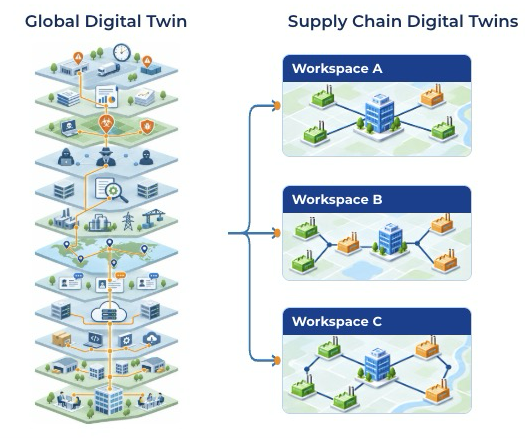
Your Supply Chain Digital Twin is your team’s map of its services, suppliers and dependencies. In Build, your team chooses which discovered relationships to include and records what suppliers have confirmed.
The Global Digital Twin connects information from the Global Intelligence Store across layers. One layer shows who supplies whom. Another shows which technologies a supplier uses. RiskStudio keeps these shared layers up to date.
In your workspace, you link shared supplier information to your own services and processes. RiskStudio stores those links in your workspace, separate from other organisations. This gives your team its own Supply Chain Digital Twin that grows with your supply chain.
For example, your customer portal and help desk might rely on the same cloud provider through different suppliers. That’s a risk you could easily miss when looking at either supplier on its own. If the provider reports an outage, the same map shows you which services to check first.
Your own supply chain
Start with a service your team relies on. Map its suppliers and follow one question through to a decision.
See what’s included on the trial page.

The cyber intelligence platform for visibility and monitoring in every supply chain. We provide insight into dependencies and monitor threats for smarter risk decisions.